
5M Phone & Smartwatch
A premium FiveM phone with a real home screen, social apps, Maps, Dispatch, 5News, and a paired 5M Watch — built for QB, QBX, ESX, OX Core, standalone, and custom frameworks. Developers can also ship their own apps on the same home screen.
Phone and watch, synced together
Try the real 5M Phone and 5M Watch interfaces — the watch pairs with the phone for calls, alerts, music, and more.
5M Watch
5M Phone
Phone UI
Every app players open on the home screen
The live preview above is the real interface — these are the apps and flows packed into 5M Phone.
Calls & Contacts
Dialer, favorites, call history, and Face ID unlock — the same flow players use in-game.
Messages
Threaded SMS with contacts, group chats, and read receipts for everyday roleplay.
Mail
In-phone email accounts for jobs, invoices, and server notifications.
Camera & Photos
Capture evidence, browse the gallery, and set wallpapers from the home screen.
Maps
Live city map with pins and waypoints — open it from the home grid like any other app.
PayUs
Check balances, send money, and manage accounts without leaving the phone.
Garage
View your fleet, fuel, and condition — then request valet when you need a ride.
Housing
See owned properties, lock state, and keyholders from a dedicated realty app.
Services
Call or message businesses — dealerships, EMS, mechanics — from one directory.
Groups
Create or join crews, manage join requests, and set Ready / Busy before jobs and heists.
Insta's
Photo feed, stories, likes, and profiles — social content built for Los Santos.
xBird
City timeline with posts, replies, follows, and DMs for public chatter.
Dark Chat
Anonymous handles and private threads — text, photos, and location drops without your number.
Dispatch
Police CAD with priority calls, officer blips on the atlas, attach/detach, and callsigns.
5News
City headlines and hashtag feeds — breaking stories players read between jobs.
5M Watch
Smartwatch that pairs and syncs with the phone
The live watch preview sits beside the phone — same contacts, calls, music, and alerts through the paired 5M Phone session.
Pairs with 5M Phone
Connect once from the phone's 5Watch app — the same number, contacts, and alerts stay in sync.
Watch Face & App Grid
Ultra-style hardware frame with a live clock face, crown navigation, and a compact app launcher.
Calls from the Wrist
Answer, decline, or place calls while the phone stays holstered — mirrored through the paired handset.
Live Notifications
SMS, missed calls, and app alerts peek onto the watch the moment they hit the phone.
Music Controls
Play, pause, seek, and volume for Spicetify tracks running on the paired phone.
Status Rings
Health, hunger, and thirst at a glance — built for roleplay vitals without opening the phone.
Waypoint Nav
Turn-by-turn style guidance on the watch when a GPS waypoint is active on the phone.
Beside-Phone Layout
When the phone UI opens, the watch parks beside it — same sync session, shared focus rules.
Maps
Los Santos at your fingertips
The real Maps app with the Los Santos atlas — pan, zoom, drop pins, and set waypoints the same way players do in-game.
Dark Chat
Anonymous handles. Private threads.
Dark Chat is the underground messenger in 5M Phone — create a handle, search users, and trade text, photos, or drop pins without exposing your real number.
- Alias accounts — register or log in with a username, not a phone line.
- Encrypted-feel inbox — unread threads, search, and one-tap chat starts for crew RP.
- Media & locations — send images or share a map pin without leaving the dark UI.
Dispatch
Live CAD for on-duty units
Dispatch is the police CAD built into 5M Phone — priority calls on the atlas map, officer blips, attach/detach, and callsign control from one LEO-ready screen.
- Priority call stack — codes, streets, plates, and flash alerts as they come in.
- Map + unit blips — Los Santos atlas with live officer positions and waypoint tools.
- Attach & callsign — claim a call, clear noise, and set your unit ID without leaving the phone.
5News
City headlines in your pocket
5News is the in-phone paper for Los Santos — breaking stories, hashtag feeds, and reporter-published articles players actually open between jobs.
- Live feed — scroll Weazel-style cards with headlines, excerpts, and timestamps.
- Hashtag filters — tap #breaking or #crime to narrow the story stack.
- Staff publish — on-duty news jobs write and push stories from the same app.
Groups
Squad up for jobs and heists
Groups is the party app on 5M Phone — create a crew, invite players, manage join requests, and set Ready / Busy status before you roll out.
- Create or join — start your own party or browse open groups looking for members.
- Leader controls — accept join requests, kick members, and dissolve the crew when the job is done.
- Live status — Waiting, Ready, or Busy so everyone knows when to stack up.
Switching from another phone?
We provide a complete Migration Tool.
Upgrading your server to 5M Phone does not mean wiping your players' data. Our dedicated migration tool safely imports numbers, contacts, galleries, notes, and chats from your existing phone script straight into 5M Phone without any issues.
Supported Source Phones
8 Major FiveM Phones ReadyPhotos, contacts, SMS, calls, darkchat, notes, twitter
SIM cards, messages, calls, media, voice messages
eSIM, SMS groups, galleries, notes, Twitter, Insta, DarkChat
Player contacts, chats, photos, mails, crypto & bills
Numbers, direct messages, photos, contacts
Accounts, contacts, chats, call logs, photos
Metadata, threads, Tweedle posts, notes, media
yCloud accounts, settings, gallery, contacts, chats
Zero Data Loss
Transfer players’ existing phone numbers, contacts, galleries, call histories, notes, and messages seamlessly.
Automated 1-Click Engine
Select your old phone in config.lua, start the resource, and it converts your entire database in batches.
Safe with Safety Locks
Built-in player join blocker, dry-run mode, and one-shot execution locks keep your live server safe.
Framework Auto-Detect
Works with Qbox, QBCore, ESX Legacy, and custom character schemas automatically.
Ready to migrate your server smoothly?
Read our full step-by-step Migration Tool configuration and database guide.
Preview
Browse in-game captures and screenshots of 5M Phone & 5M Watch
What is 5M Phone?
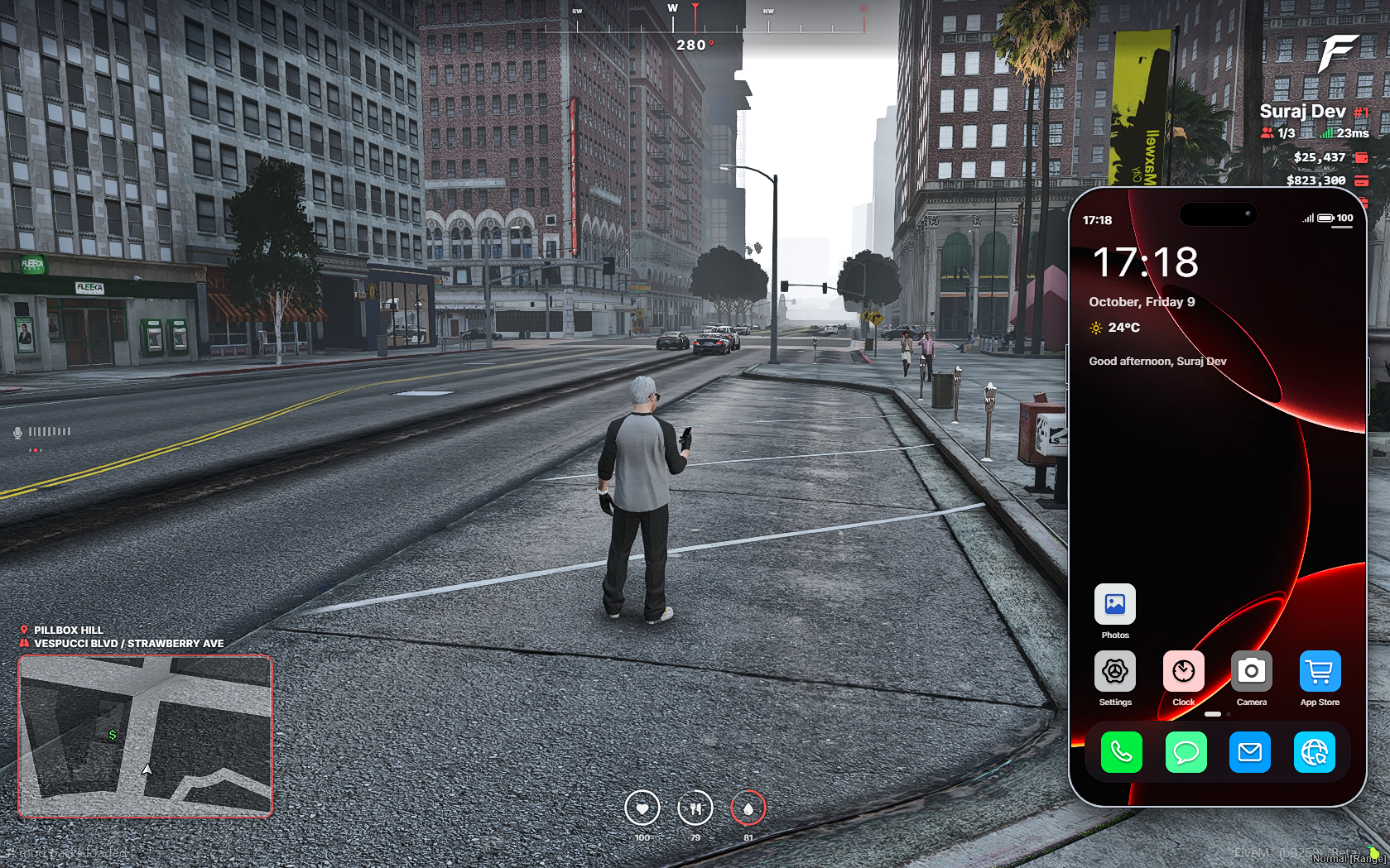
A premium FiveM phone with a real home screen, social apps, Maps, Dispatch, 5News, and a paired 5M Watch — built for QB, QBX, ESX, OX Core, standalone, and custom frameworks. Developers can also ship their own apps on the same home screen.
Players get a polished iOS-style handset with calls, messages, mail, camera, wallet, garage, housing, services, groups, Insta, xBird, Dark Chat, Maps, Dispatch, and 5News — the same UI you preview on this page.
Built-in apps players actually open
- Calls & Messages — dialer, contacts, threaded SMS, and Face ID-style unlock for everyday RP.
- Maps — Los Santos atlas with pins, waypoints, and live location tools.
- PayUs & Services — balances, transfers, and business call/message directories.
- Garage & Housing — fleet, valet, properties, and key management.
- Social — Insta, xBird, and anonymous Dark Chat for crew RP.
- Dispatch — police CAD with priority calls, officer blips, attach/detach, and callsigns.
- 5News — city headlines and hashtag feeds for Weazel-style storytelling.
Build your own apps
Developers can create custom apps that install on the 5M Phone home screen — same icons, open flow, and NUI patterns as the built-ins. Ship server-specific tools, job tablets, or unique RP features without replacing the whole phone.
- Custom app framework for server-specific apps
- Appear on the home grid next to stock apps
- Reuse the phone shell, navigation, and theme
- Documented hooks so your team can extend without forking the core UI
5M Watch included
Pair once from the phone. Answer calls, peek notifications, control music, check vitals, and follow waypoints from the wrist while the phone stays holstered.
Framework ready
- QB / QBX / ESX / ox_lib compatible
- Standalone — no framework required
- Custom frameworks via configurable bridges
- Clear
config.luawith sensible defaults - CFX asset escrow protected
- Lifetime updates with your purchase
Migration tool included (Zero data loss)
Upgrading from your previous FiveM phone script? You don't have to wipe your community's data. Our dedicated 5M Migration Tool converts player numbers, contacts, galleries, notes, messages, and calls safely with automated safety locks.
- LB Phone — phones, contacts, calls, gallery, notes, darkchat
- 17Movement Phone — SIM cards, settings, contacts, messages, gallery, calls, voice messages
- GKS Phone — settings, eSIM, contacts, calls, SMS, gallery, notes, social apps
- QB Phone (qb-phone) — player contacts, messages, gallery, mails
- NPWD — phone numbers, messages, contacts, photos
- okokPhone — contacts, calls, messages, gallery
- Quasar Smartphone — numbers, metadata, threads, messages, notes, Tweedle
- YSeries Phone — yCloud accounts, gallery, contacts, messages, notes
Why servers pick 5M Phone
- Modern UI that stays smooth on busy cities
- Apps wired for roleplay — not empty shells
- Developers can add custom apps on the same home screen
- Zero data loss migration tool for instant server switching
- Live storefront preview matches the in-game experience
- Install docs and support so you are not guessing in production
Are you ready?
There is so much more to explore.
What are you waiting for?
Support
Stuck on install?We answer on Discord.
Join the 5M Phone community for setup help, update notes, and direct support from the team — faster than waiting on email.
Free · usually online daily
5M Phone Support
Community · Docs · Updates
- Install & framework help
- Bug reports with quick replies
- Changelog pings when we ship